I often find myself in need of a tool to do some quick but good-looking plots of tabular data. Pandas and Matplotlib have been my go-to tools for generating these plots for years, but lately I've realize that I spend way more time than I should because I always have to do Google searchers for little tweaks. Yesterday while preparing the data for the glucose plots, I decided to experiment with Cursor to see if I could get the plots done faster by describing what I wanted and having AI build out the code for me. In this post I'm reflecting on what did and didn't work.
Basic Plotting
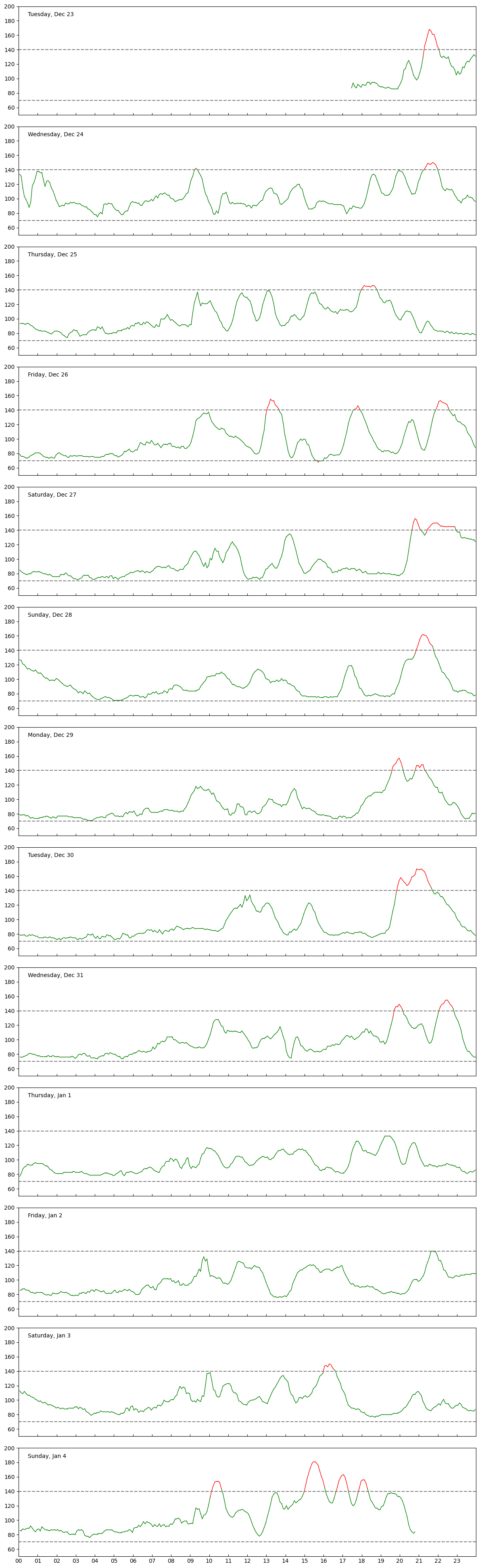
For the Glucose post my goal was just to load the data as a table, split it up by day, and do a vertical stack of plots that lined up based on the hour of the day. The input data was straightforward- just a CSV with a well-formatted date (with timezone!) and a numerical value. If I were writing the plotter by hand, I would have used Pandas to load the table and deal with dates, and then sent individual days of data to a subplot plotter. As good as Pandas is, there are still some tedious parts to making this kind of plot. First, dates often have parse problems, especially when timezones are involved. Second, I always have labeling problems when I use dates on an axis (eg, the wrong part of the date gets displayed or there isn't enough room for everything. Finally, I often waste a lot of time tweaking different settings for a plot, like tweaking labels, axis settings, and aspect rations when trying to stack a lot of plots together.
Describing the plotting code I wanted Cursor to build for me worked out fairly well. It properly used Pandas to read the data and did a to_datetime to convert the time strings. For the plotter it used a datetime.combine function I didn't know about to set the start and stop times for a day. Initially everything was off by 8 hours because of timezones, but it corrected it once I described what was wrong. It did the day splitting correctly and built a stack of plots that looked right without much effort on my part.
Tweaking
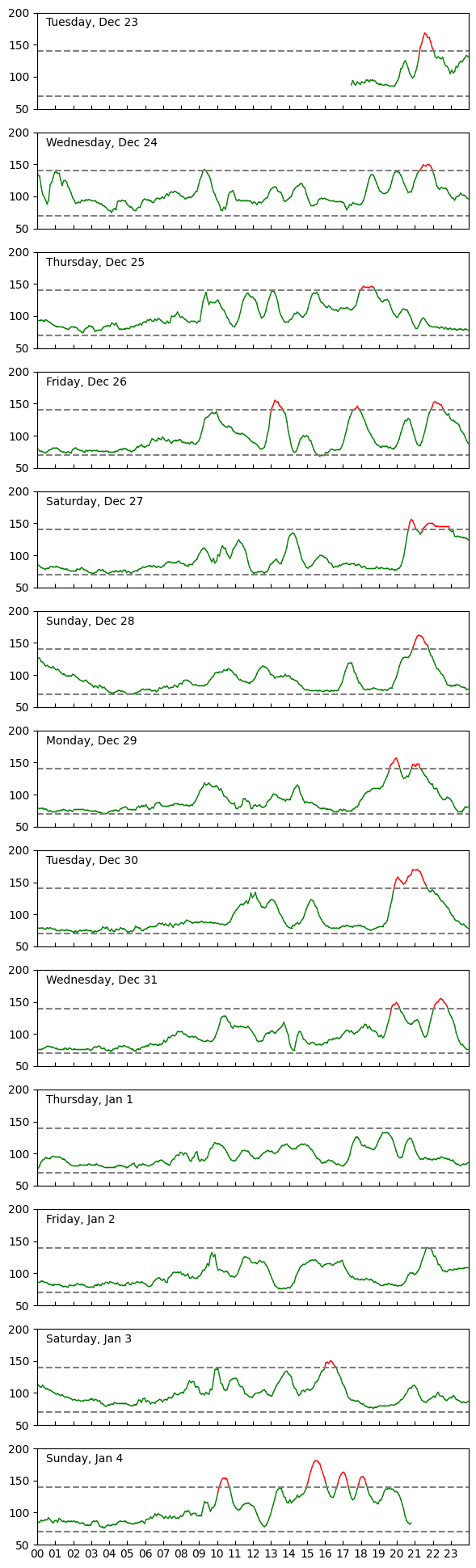
Once the basic plots worked, I went back and had it do some refinements. I cleaned up the overlapping plot problems by disabling the horizontal labels on the upper plots and had it move the title into the box area. I had it adjust the figsize and linesize properties to deal with full-sized vs thumbnail scaling problems. I added horizontal lines to show the cutoffs for good and bad regions. Finally, I told it to set the line color to green or red based on whether the line was in the good or bad regions. I don't usually put that kind of detail into a plot because it requires some effort to break up the data into color segments. However, the AI wrote the code I wanted and made plots that were better looking than I would have done.
CLI
Another problem with throwaway plotting code is that I'm often on the fence about whether I should hard code filenames in it or add in CLI parsing so that I can iterate with it on the command line and generate multiple plots. I usually use the Click library when generating CLI tools because it lets you control a lot of arg parsing behaviors through simple decorators. I've added some default instructions to my Cursor environment to use Click when implementing CLI tools, so it was easy to just modify the plotter to take input from the command line.
I instructed Cursor to allow the user to specify a single date to plot so that I could highlight individual days. Once that worked I prompted it to do a comma-separated list of days. This feature helped me generate the examples where an event was spread out over two days. Again, implementing this kind of code by hand is not hard, but it's another burden that gets in the way of finishing a plot.
Observations
While the AI model generated a few code blocks that were either sloppy or wrong, it worked very well for what I needed and let me work through generating the plots quickly. In some places it made better plots than what I would have done, simply because the amount of effort to code the feature was higher than the benefit it would have given me. With AI you can just describe it, see if it works, and then keep it if it's good.
An important point of this is that it works well for me because I already know how Pandas and Matplotlib work. I also know what questions I'll ask to get effective results from Google or Stack Overflow. I'm not sure how great this would be if you blindly asked it to make some plots. Like a lot of CS problems, using AI effectively boils down to I/O: it only works if you can describe what you want and then have the reasoning skills to interpret what it gives you back.
The transcript for the session is now available here: snippets/260124_glucose
2026-01-24 Sat
data medical
At the beginning of the winter break a friend of mine texted me about how he'd been using a disposable glucose monitor to get better information on how changes in diet and exercise affected his body. He said he'd been using a $50 sensor from Lingo that could be bought over-the-counter from Amazon. I watched a few videos about glucose monitors and learned that the Lingo device is a small, embedded sensor that has a two-week battery and uses Bluetooth to connect to your phone. I had some time off for the holidays, so I decided to order one and see how bad my numbers were. Amy joked, "What could go wrong, ordering a bargain medical tracking devices from the web?"
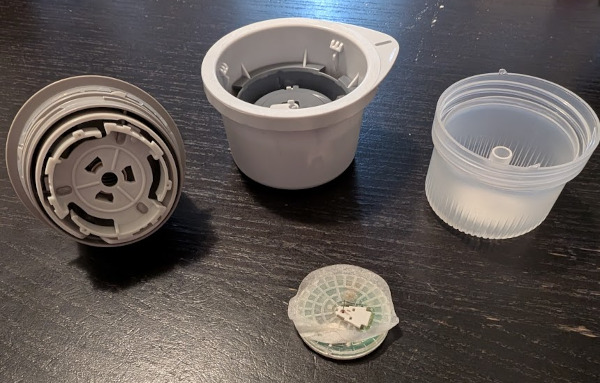
Slightly Used Glucose Monitor
Lingo Sensor
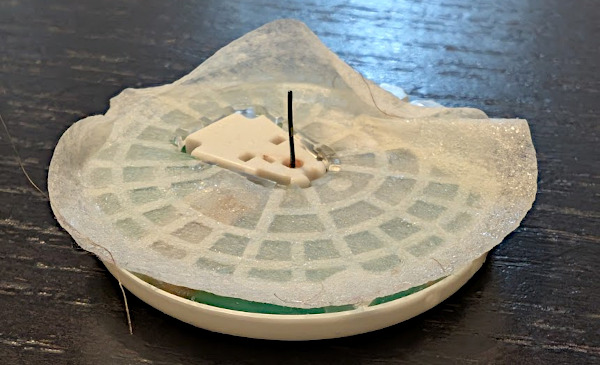
A box arrived a few days later with instructions, a QR code, a single sensor, and an ominous spring-loaded device to apply the sensor. When I pulled the sensor out of it's protective case, I heard a clicking sound and saw this longer than expected needle sticking out of the center. It reminded me of Indiana Jones poison needle booby traps. After swabbing down the backside of my left,upper arm with rubbing alcohol, I loaded the sensor disc into the application device, held it awkwardly to my arm, and pushed the trigger to have the device poke the needle into my skin. While the length of the needle looked alarming, it didn't hurt much to apply it. I installed the phone app, linked with the device, and saw a message that the device needed to run a bit before the data would be available.
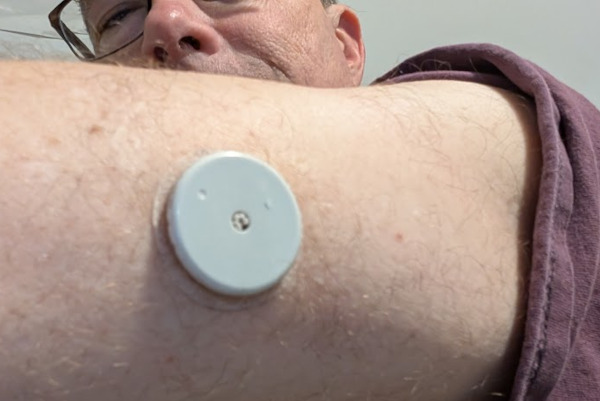
Having had problems with nearly every single Bluetooth device in my life, I was relieved when the app started reporting out data a short time later. The monitor captures your glucose level, which Lingo says should range from 70-140mg/dL for someone that is healthy. The levels are expected to run low when you don't have food, but then spike after you eat. The main things to look out for are if your numbers go very high (around 200?), fall below 70, or have spikes that last longer than 3 hours.
Initial Spikes
My friend said that he did some baselining of his sensor by going to some fast food restaurants and eating meals that are clearly bad for you. I've done away with the burger lifestyle this year, but I still like restaurants and am particularly weak when it comes to desserts. For dinner the first night we went to a new Algerian restaurant (MezaNMoka) where I had chicken shawarma. The food was good and my numbers seemed ok, but after the meal we ordered some of their (amazing) pastries to take home. The pastries put me above 140 so Amy and I went for a walk around the block. That helped bring the numbers down, but I had a little more when we got back. The numbers seemed high before bed, but the next morning it looked like everything had settled back down after a few hours.
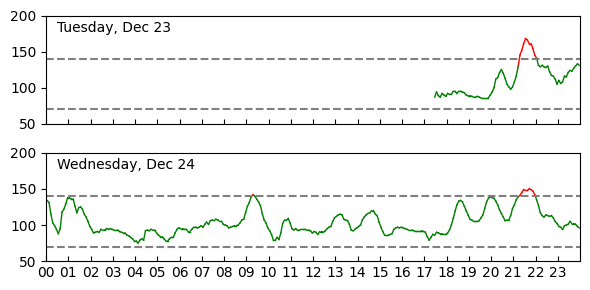
Continuous Monitoring
Having instant access to my current glucose levels was strangely interesting. The numbers went up after meals or snacks, but then decreased with a little time. Seeing the numbers helped remind me not to snack on things, though it was difficult to stay on course given the holidays. Generally, it seemed to be beneficial to go out for a walk after a meal. The numbers always seemed to be high when I missed a walk or just sat on the couch watching TV for the night.
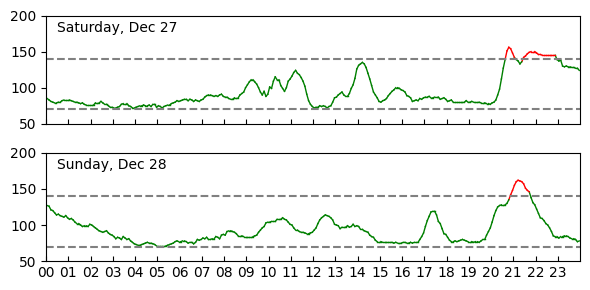
I noticed a strong correlation between my mood and the spikes. On Saturday night I had a big dinner followed by a larger serving of ice cream I should not have had. The numbers crossed the line, but what was more alarming was that it took a long time for them to get back down to normal levels overnight. I felt bad that night and a little like I was hung over the next morning. Later in the week I had a much more constrained amount of ice cream and didn't feel bad or have high numbers.
Removing the Patch
The battery on my device seemed like it would have run for the full two weeks, but I had to take it off early because work doesn't allow you to bring in personal devices. Removing the patch was rotten- the sticky pad had a very good grip that pulled out some hairs. I wasn't bothered much by the device when I was wearing it, but it also felt good to be done with it. I'm not sure how to properly dispose of it as it has a battery and my data on it. I guess I'm releasing all of that data below, so that's not much of an issue.
All the Data
The Lingo app worked pretty well for interpreting the data. They gave a place to enter in information about food and exercise that they then used to annotate plots of your data. I was motivated to enter this information (unlike other diet tracking apps), because it helped me interpret my plots. Lingo has an option to export the Glucose data to a CSV, which I very much appreciate. Below are plots I made from the data export. My export didn't have the food and exercise info, but that's all ok to me. I've checked my code and data into my snippets repo.
Thoughts
So yeah, Diet and Exercise can help you feel better. Who knew? This experiment was useful for me though, because I could get live stats and make correlations between what I was doing and how I was feeling. While there are people that get their insurance to pay for these patches continuously, I think a single run of this test was good enough for now.
Snippets
The code and data for this project are now here: snippets/260124_glucose
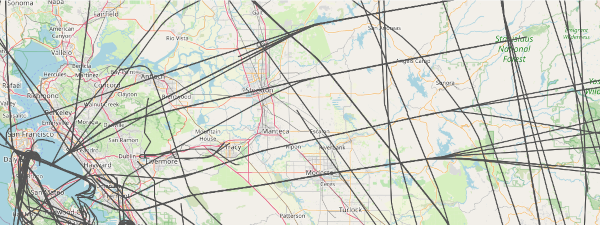
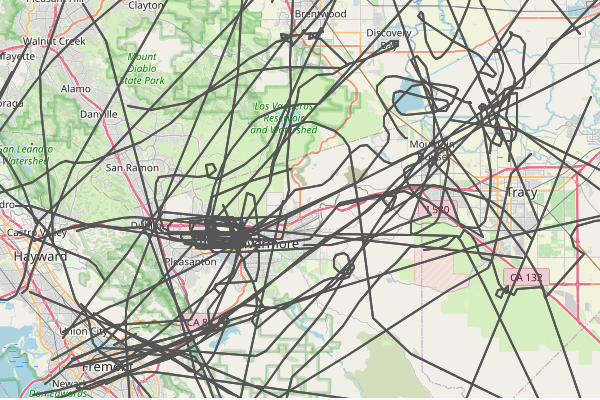
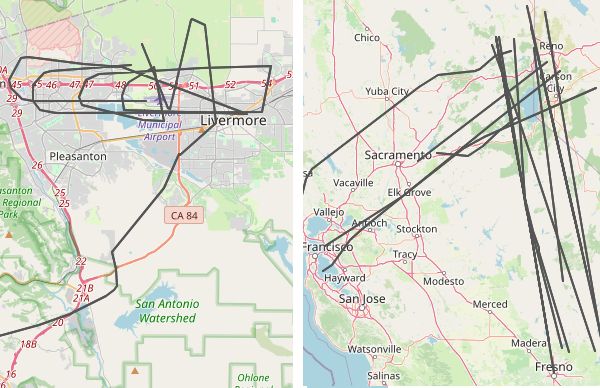
Following up on yesterday's Datasette post, here are some example plots that I made using the tags my parser generates when converting the data. In each plot, I added a clause like "WHERE IsLivermore='1'" to the SQL to the Datasette command.
Passenger Airlines
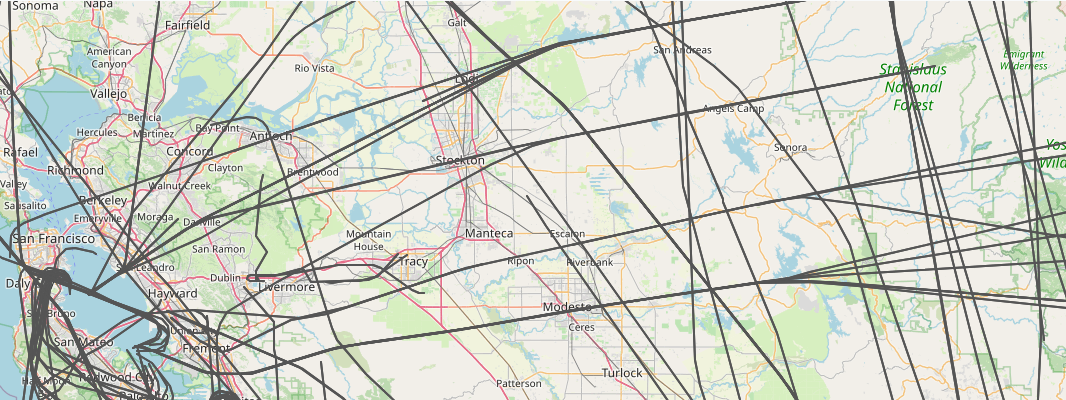
The main planes I see are passenger airplanes. They're boring and get in the way of more interesting flights, so it's useful to tag as many of the big airlines as I can. Below is a plat for just the passenger airlines. The interesting part about this is that you can see how they follow regular corridors in the bay area. If you click on the picture you'll see that planes going west funnel into one of four lanes after they cross the Sierra mountains. It's like Missile Command.
Passenger Airlines
Little Guys
In contrast, if you pick out all the independent planes that are just tagged with a tail fin starting with N, you see the little guys wander all over the bay area. Sometimes the make loops or circle a lake.
N Tail Fins
Pass Through
The data parse I wrote also has some geospatial filters that tag any plane that crosses through a specific region. I have a few setup to tag flight around Livermore, including one that looks for low-flying flights over the city core. Usually these flights are connected to takeoffs and landings at the local airport, but sometimes they're just small planes that don't care. I have another filter that tags flights over Tahoe/Reno. I'm always impressed that my SDR sees that far out. Sometimes the planes aren't even traveling to the bay area,
Livermore and Tahoe
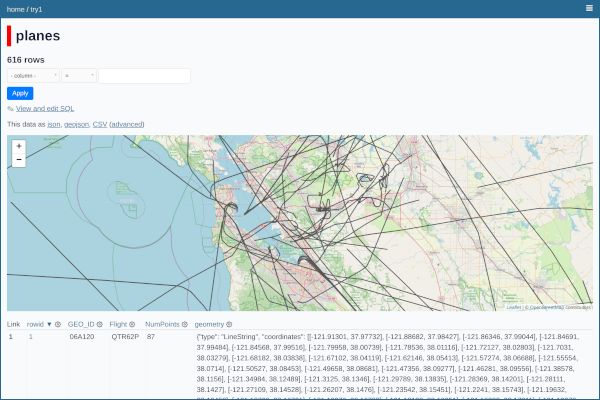
A year ago I went on a side quest to refactor how I'm collecting and analyzing airplane data at home. Like most of my home projects, I spent a lot of time learning something new, but lost momentum before I could close things out. As part of a new year's resolution to finish loose ends, I'm writing a quick summary about what I learned and putting a snapshot of the code in github so I can revisit it later.
Viewing Airplane Tracks in Datasette
Airplane Logger
I've been running a PiAware server at home for several years that collects airplane positions from an SDR receiver I have in the garage. When I originally set this up, I wrote a tool called d1090-companion in Go to help record positions, generate daily track files, and allow me to visualize the results through a webserver. The tool has been running for years now, happily generating daily gzipped TSVs that I almost never look at because the maps API key I setup expired. I've always had thoughts about rewriting the companion, but my Go knowledge is out of date and I don't want to refresh it. Ultimately, I'd like something that lets me visualize the data better, filtering out boring stuff and highlighting unique planes.
Trying Out Datasette
While thinking about alternatives I came across Simon Willison's Datasette, which is a tool for making a mix tape of data that you can inspect with a browser. Willison's original idea was that a data provider should pack up their data into a SQLite file, put it on a read-only website, and then run a common web frontend that lets analysts do SQL queries on the data to slice it the way they want and plot the results. There are a number of plugins available for visualizing the data, including a map plotter that looked like it would be great for my airplane data. I found some other useful plugins, like reading from Parquet and GeoJSON files.
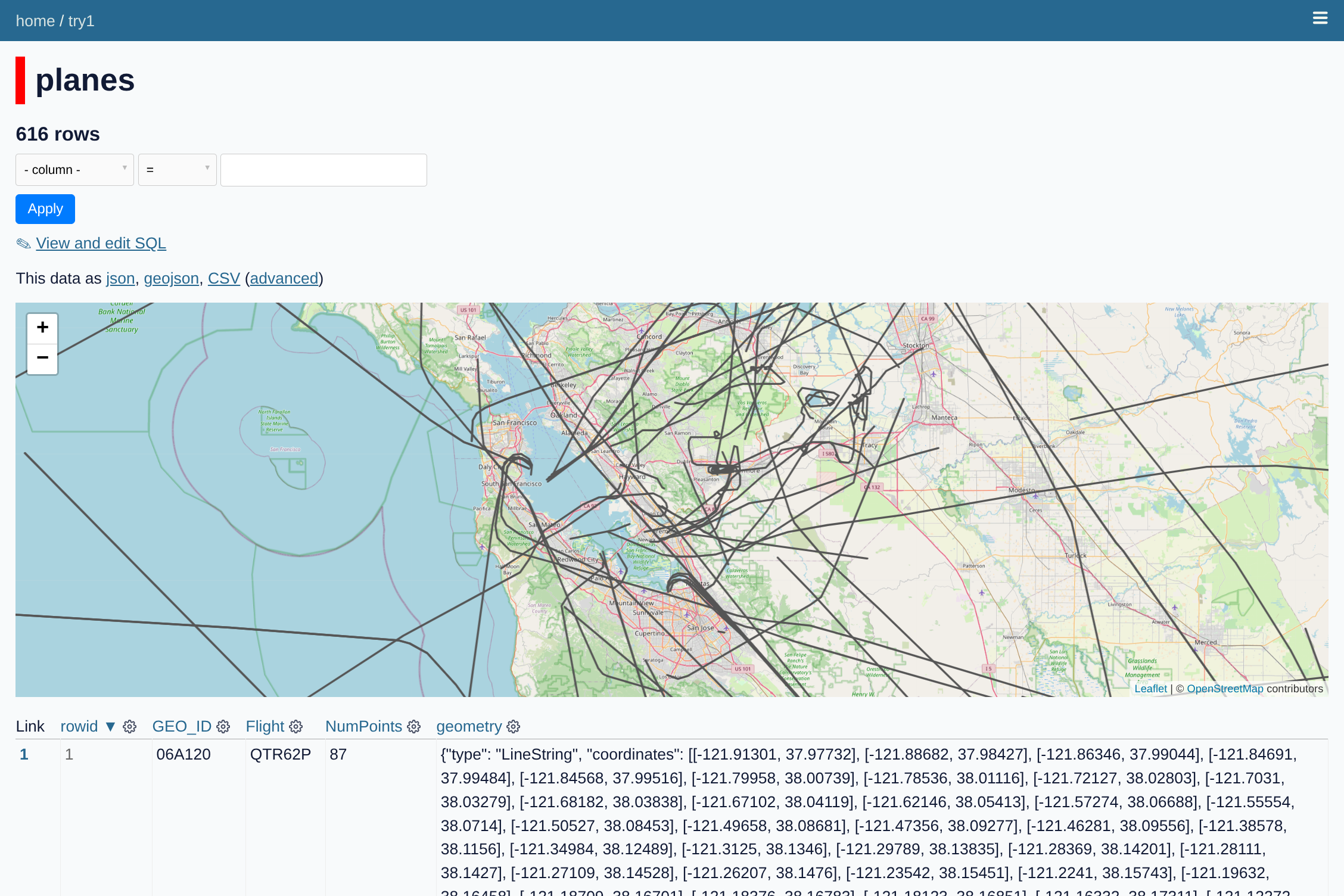
I initially started with the cluster-map plugin which lets you show individual Lon/Lat points on a map (with built-in clustering during zoom-out). The examples were great, but I didn't see an easy way to render tracks. I switched to using the GeoJSON plugins, which take a GeoJSON file and convert it to a SQLite DB that a map tool can plot. It took some tinkering, but I eventually confirmed that if I could export my tracks to GeoJSON, the tools would plot them ok. I wrote some Pandas code to parse my TSVs, clean them up, and convert the tracks to GeoJSON.
Good and Bad
There were a lot of things I liked about this approach. First, it meant I could just generate data files and hand them off to something else to render. Second, the SQL interface for Datasette is pretty powerful- once the page is up, I can put in queries to filter the tracks down (eg all ICAO's that start with AE). This feature motivated me to add columns at generation time (eg, IsMilitary) to make downstream search easier. Finally, there were just enough plugins I could do useful things without too much frontend knowledge.
I stalled out on the project though because there were a few things that weren't great for my use case. First, the Datasette version I used ran a rest API on the server to interface with the data. My PiAware is already loaded down with work, so I'm hesitant to put another API on it that isn't heavily used. Datasette-Lite looked like a promising alternative- it looks like it embeds the file processing in webassembly, so the client fetches the data and runs it on the client. Second, while the GeoJSON plotters were great, the plots were a little clunky and I had trouble figuring out the right way to render all the views I wanted. Datasette can probably do what I want, it just takes more effort than I want to put into it right now. Finally, there's still some data balance problems with the whole system. I probably need to downsample the tracks to get things to be more responsive.
Code
I've put a snapshot of the code at snippets/250221_planes_datasette so I can come revisit this someday. Looking through it again, I realize that another reason I stalled out was because I got obsessive about trying to identify all the big airline codes so I could filter them out. The private charter planes seem to be getting sneakier for how they label themselves so they blend in with everyone else. There's plenty of room for hanging yarn with Datasette though, so at some point I'll need to come back to this.
The idea that the CS field is about to be flooded with know-nothing vibe coders worries me. Last year when I tried out Codeium in VS Code, I thought it was neat but nothing to worry about since I had to do a lot of corrections to the code to get it to work properly. There have been a lot of stories in the news lately about Cursor and Claude Code though that made me wonder if things have gotten substantially better since then. The thing that pushed me over the edge this week though was that I started thinking about how long it's taking me to refactor some data products using Pandas. It's fun tinkering with Pandas, but almost always I'm writing some throwaway code that nobody will ever see. It takes a long time to do simple things and I still catch myself making dumb mistakes. It all seems like the kind of stuff an AI tool could do better.
On Friday I caved and downloaded a copy of Cursor for Linux on my Chromebook. Youtube is flooded with smiling videos on how to install and use Cursor. My summary is, they forked VSCode and modded it so there's an integrated prompt session on the side. You tell it what you want it to do next with your project, the prompt and code go to their servers, they make their own prompts, and then it gets sent out to high-end AI engines like Claude and Gemini Pro. You pay them $20/month to use the service with throttling, or $200/month (sheesh) to get more prompts. The interface is very good- it does all the project creation stuff you want VSCode to do (eg create a venv, install packages, and add them to requirements), plus it checkpoints your state so you can undo things when things go wrong.
Bouncy Ball Game
I didn't have a great idea about what to build when trying out Cursor, so I fell back on the 1980s arcade game approach. I started by asking it to draw some bouncing vector point balls similar to the ones you see in 1990s Amiga demos. It created a project, installed pygame, and wrote some basic code that ran without any nudging. The balls vector dots, but they were 2D so I asked it to switch to 3D balls that rotated and spun. This actually worked, though it drew lines between points that I then had it remove with another prompt. I went on to add some pin ball style bumpers, which took some more prompts to refine. From there I added a line at the bottom with one hole, then two, to make it more of a game. With additional prompts I had it add a score count, use more and smaller balls, and flash a game over menu when the last ball went into a hole.

Admittedly, this should be an easy problem for AI because there are a ton of examples out there and pygame is well equipped to do a lot of the heavy lifting for you. I did get one Python error in the process, but copying the message into the chat motivated the AI to look at the code and realize there was a use before initialize error that it needed to fix. The code and comments seem pretty reasonable. I think the only annoyance was that there were some subtle collision problems in the game that didn't seem to be easy to fix (either through chat or by debugging the code). I hear that quirks like this often pop up with vibe code and that it's hard for anyone to go back and figure out how to fix them. My worry here is that the future will be filled with apps that look like they're working, but they'll have random mistakes in them that cause significant problems when you do nonstandard things.
Platformer
I showed Cursor to my older son and asked him to write his own game so he knows what other people his age will be using. He chose to write a simple Mario-style platformer. The initial prompt yielded an Atari 2600 style game where a blue rectangle could wander around and jump from one green bar to another. It worked but he quickly realized that some platforms were unreachable while others didn't stop you from falling through to the ground. He issued prompts to fix the problems, then went about adding coins, a scoring system, and a level clearing message that included fireworks. He then asked it to switch the blob character to a Mario. Interestingly, the AI created a separate program that used pygame's shape primitives to draw a Mario character and save it to a png the game program could load and use. When he asked it to animate the character when it walked, it modified the image generator to make multiple images. At first it didn't look like the new images did anything different, but when we zoomed in on the pictures we realized it had put a single blue dot for a foot and toggled where it was when the character walked.
My son play tested the game and found that it mostly worked. There were a few frustrating bugs where if you hit a specific platform in a particular way you'd go through it. It reminded me of how the original Joust had a big with the pterodactyl that people loved. Maybe the quirks of a game are what make it special. Still, it's tough figuring out where all the bugs might be in a program like this, let alone fix them all.
PIAware Flight Receiver
My son was willing to put another 5 minutes into prompting things, so I had him ask Cursor to build some Python code to connect to a socket on my PiAware station. We gave it a specific IP/socket and told it that the port dumps out plane update information in a standard CSV format. When we told it to print out info every time it saw a new plane, it spewed out a lot of data that didn't look right. I realized it was getting misaligned because it wasn't handling the end of line properly. Once we explained the problem it fixed the code and properly printed out new plane IDs every few seconds.
While ADSB traffic is pretty well documented, I was impressed that the AI wrote code to open a socket, parse CSV lines, and print out the useful information. Writing this kind of code by hand is fun, but there are enough tricky spots that by the time I finish it I don't want to do anything else with it.
Thoughts
So, yes, just like other people are saying, Cursor is appealing because you can steer it to write code that would otherwise be tedious to write. It feels like cheating though, and requires you to keep a close eye on what it is actually building. The more people use Cursor, Claude, and the like, the better I think these tools will get. I do wonder how much developers will be willing to pay for these services. I think a lot of new developers will get hooked on the AI tools and then flounder when either the AI companies jack their rates. I'm still going through the 2 week trial process, but I'm thinking I wouldn't mind paying $20/month to hack on personal projects faster, especially if it means canceling one of the streaming services I have but never use.