After passing the prelimary exams to enter the Ph.D. program at Georgia Tech, the next major step is passing the qualifying exam. The purpose of the qualifying exam is to show that a student can walk into a new topic, learn everything they can about it, write a reasonable summary of the current state of the art in that topic, and present the material to a committee, all within one month's time. I picked a committee of people that I knew were tough but fair and hoped the best in topics. I was relieved when they asked me to focus my attention on using FPGAs to enable a field of computing called configurable computing.
I spent a coniderable amount of time that month downloading papers and looking up conference proceedings in the library. While I'd worked with FPGAs some during my masters degree, I didn't know the ideas went all the way back to the 1960's (I actually found Gerald Estrin's fixed+variable paper in print at the library). I learned a good bit about the commercial chip families and marveled at some of the ideas people were talking about with custom computing machines. There's nothing better than having an excuse to set aside to learn all you can about an interesting subject. It took a bit of work to get a handle on how to summarize the material I'd covered and put it into a presentable form that had a hard page limit.

My review committee included three computer architecture professors and two network professors that had a background in hardware. Of the five, Vijay was the only professor that worried me. I'd taken a rapid prototyping class with him earlier and had seen him rip into a few students when we had to take turns presenting other peoples' research papers. Fortunately, I realized before it was my turn to do a class presentation that he was only vicious because he wanted to get to the truth of an idea. When he raised issues during my class presentation, I defended the topic and didn't back down, which I think he respected. However, I wasn't sure how well this confidence would carry me in my own exam.
In the end things went pretty well. Dave probed me on some parallelism questions, which ironically Vijay answered for me thinking Dave simply didn't understand the material. They sifted through the cookies I'd brought, asked me to leave for the closed discussion, invited me back in, and then told me I'd passed like that. It was a huge relief and a boost to my confidence.
Publications
- Qualifying Exam Craig Ulmer, "Configurable Computing: Practical Use of Field Programmable Gate Arrays".
Presentation
1997-11-10 Mon
dsp code pub
During my (first) senior year as an undergrad at Georgia Tech, the ECE department implemented a large curriculum change for Computer Engineers. One of the big changes for me was that the digital signal processing (DSP) group pushed to get an intro to signal processing class taught at the beginning of the program instead of as an elective. The idea was that they wanted to show new students what they could do with DSP so they'd have a motivation to continue through the (often boring) math and circuit courses and graduate. While I could have just followed the old curriculum to graduate, I signed up for the first class of EE2200, taught by Ron Schafer. It was the best class I took as an undergrad, as it opened up my eyes to how all the math and circuitry work I'd done in other classes could be used to do something fun.
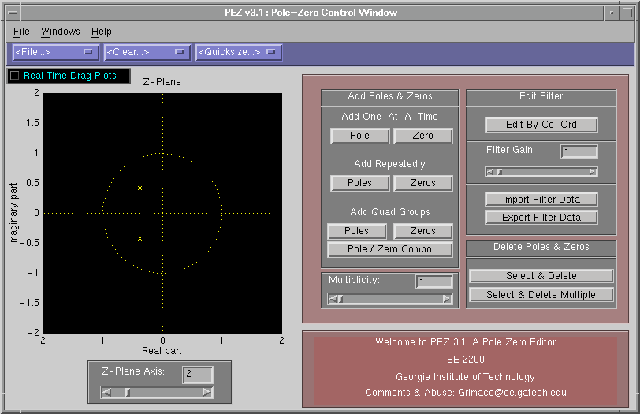
After a follow on course in analog signal processing, I asked Dr. Schafer if there were any self-study projects I could do to learn more before I took the senior DSP electives. He mentioned that there had been a lot of improvements in Mathwork's Matlab software recently, and the department was interested in figuring out whether they could use its new GUI features to help build more demos that could be used to teach DSP. I signed up and started learning how to use the GUI commands to build simple demos. The first few programs were pretty trivial, simply providing sliders and edit boxes so people could more easily change paramterers to see some DSP concepts visually. Then, Dr. Schafer asked me to write a simple Pole-Zero editor that would allow people to graphically move a filter's poles and zeros around in the Z-plane and see the responses. After a lot of work I had a program called PeZ. Dr. Schafer was pleased with it (after he corrected some spelling mistakes!), showed it to Dr. McClellan, and then we pushed it out to the Matlab mailing list. People were enthusiastic about it, so I continued improving it. Eventually Schafer and McClellan wrote a book called DSP First that captured the teachings and demos of EE2200. They included PeZ on a CD that came with the book and had some text about how to use it in the book.
Writing a Pole/Zero Editor
Initially PeZ started out as something simple: we just wanted a panel where a user could click on the Z-plane to add/remove poles and zeros. After updates were made another window showing the response functions would update. This functionality was pretty useful by itself- when explaining things to students you graphically show how delay got introduced in the impulse response, or the system blew up when you put a pole outside the unit circle.
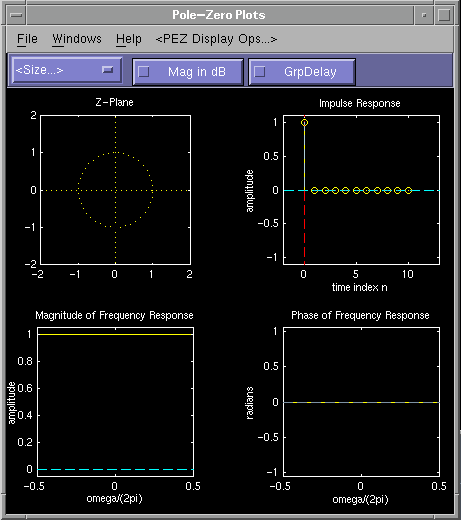
It didn't take long for people to start asking for new features. I had to find a way to deal with multiplicity (putting multiple poles at the same place). People wanted an edit panel so they could look at and edit the exact coordinates of a pole/zero. McClellan pushed for an option to add pairs of poles/zeros at a time (symmetric to the xaxis, or at inverse distances from the unit circle). People wanted a better way to print their figures (someone else wrote a nice printer option menu and allowed me to use it).
The big feature though was being able to drag poles/zeros around and see the response plots change in real time. Adding the basic drag functionality was hard- Matlab didn't provide good GUI tools at the time so I had to do a lot of low-level GUI operations to figure out when someone was clicking on a pole/zero, moving it around, and then letting go of the mouse button. The system worked, but all the calculations made the whole thing clunky, with updates happening about once a second. I did a good bit of work to improve things on our UNIX workstations, but for some reason the Windows version of Matlab really lagged behind. Fortunately, Dr. Yoder at Rose-Hulman had a motivated student named Brad North hack on it and fix it. Brad did some crazy optimizations with how things were refreshed and made huge improvements for all the versions.
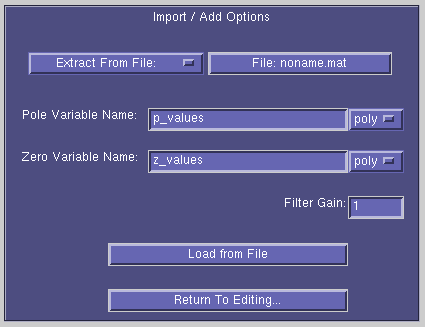
One of the last cool features I added was the ability to import data from other Matlab sources. I made a special interface to talk with Mathwork's awesome filtdemo tool, which allowed you to generate common filters in a parameterized way. You could save and load values from a file. Also, you could pull in data from the existing Matlab environment. This import was useful because it meant you could build your own filter tools/functions and then pass the filter parameters into PeZ.
Matlab's Amazing Portability
One of the amazing things about coding up the GUIs in Matlab was that it (potentially) made my code usable on a large number of OSs and platforms. Matlab served as a mini-os in a sense, normalizing differences in GUIs between different OSs. I did almost all of my work on HP Apollo workstations in the CoC, but the GUIs (eventually) worked on Windows, Mac, and Sun. This portability blew our minds when we started- you have to remember that Java didn't exist at that time and most GUI work meant a lot of X hacking. Matlab definitely did have cross-platform compatibility problems (especially Windows). However, I was always able to hack around most of these problems and provide one program that ran everywhere. Mathworks did well when they jumped from version 4 to 5- it didn't take much work to get PeZ running because they continued to support their legacy APIs.
In retrospect, the only way I made it through PeZ's initial development was by not knowing how horrendous it really was. The GUI code was extremely difficult- there weren't any editors at the time and you had to manually define all the coordinates of every object. Whenever a prof asked for a new button, I had to go back and redefine the coordinates of every GUI object. Matlab 4 was missing some key things: you could only put one function in a file and they didn't have data structures (beyond matrices). That meant you had to find clever ways to push information around between functions (for speed, I used lots of globals). The worst thing though was that I embedded script commands into the callback operation of every button. These scripts had to be encoded as strings, so they often had a lot of escape sequences in them so I could do things like put a tic inside of a tic.
Global Users
Back when I first started PeZ the Web was new and we simply didn't have the devtools we have now (e.g., not Github. Nor git for that matter). After PeZ was in a good enough state to release, I made a posting to the Matlab news group about it. A lot of random people emailed me about it to ask questions and give feedback. I eventually put up an awful-looking webpage off my Ga Tech account that provided download links and gave more info on how to use it. At one point I had a map showing all the different countries where PeZ had been used.
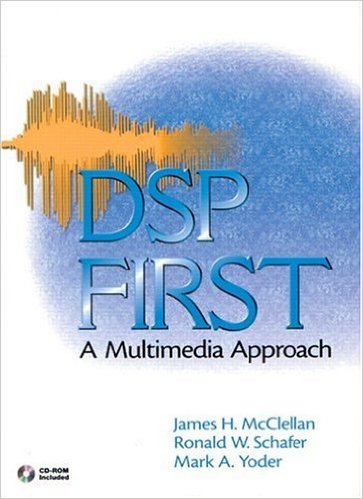
Schafer, McClellan, and Yoder organized a group of students to help put together some tutorials and multimedia demos that could be used to supplement a new book they were writing for their EE2200 class. We had a lot of good discussions about cool things that could go on the CD- at the time Java was available and provided a better place for hosting software since you only needed a browser to run it (Matlab was still $100 for a student). We talked about doing a Java port, but decided against it because the work looked supstantial and I was moving on to other things. The team put together a great CD of things- I was happy to get PeZ on it and be included in a book that was used by so many students.
Publications
- DSP First Book CD James McClellan, Ronald Schafer, and Mark Yoder, DSP First: A Multimedia Approach, Prentice Hall, ISBN-13: 978-0132431712, January 1998.
Code
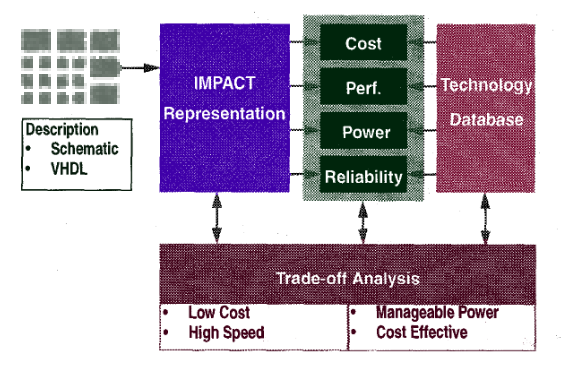
As a follow on to our first MCM paper, we built a tool called IMPACT to make it easier for chip designers to explore different packaging options early on in the design process. We were invited to add to our conference paper and improve it for an IEEE Transactions on Components, Packaging, and Manufacturing Technology journal article.
Abstract
This paper explores early analysis of the complex relationships between system architectures and the active and packaging materials from which they are implemented. The goals of this analysis are to enable the designer to specify cost effective technologies for a particular system, and to uncover resources which may be exploited to increase performance of such a system, early in the design process. We describe a prototype tool called IMPACT, which will predict cost, performance, power, and reliability, and present several case studies demonstrating its use.
Publications
- ICISS Paper Vivek Garg, Darrell Stogner, Craig Ulmer, D. Scott Wills, and Sudhakar Yalamanchili, "Early Analysis of Cost/Performance Trade-Offs in MCM Systems", IEEE International Conference on Innovative Systems in Silicon, 1996.
- Journal Paper Vivek Garg, Darrell Stogner, Craig Ulmer, David E. Schimmel, Chryssa Dislis, Sudhakar Yalamanchili, D. Scott Wills, "Early Analysis of Cost/Performance Trade-oFfs in MCM Systems", IEEE Transactions on Components, Packaging, and Manufacturing Technology: Part B, Vol. 20 , Iss. 3, Aug 1997.
During my master degree I did predictive modeling and simulation for Georgia Tech's Packaging Research Center (PRC). For this work we combined several EE models for circuits and packages to estimate when it would make sense to use multi-chip module (MCM) packaging instead of building large monolithic dies. In this paper we made the case for considering packaging choices early on in the design process so that designers could make better choices.

Abstract
Computer system design addresses the optimization of metrics such as cost, performance, power, and reliability in the presence of physical constraints. The advent of large area, low cost Multi-Chip Modules (MCM) will lead to a new class of optimal system designs. This paper explores the early analysis of the impact of packaging technology on this design process. Our goal is to develop a suite of tools to evaluate computing system architectures under the constraints of various technologies. The design of the memory hierarchy in high speed microprocessors is used to explore the nature and type of trade-offs that can be made during the conceptual design of computing systems
Publications
- EDTC Paper Vivek Garg, Steve Lacy, David Schimmel, Darrell Stogner, Craig Ulmer, D. Scott Wills, and Sudhakar Yalamanchili, "Incorporating Multi-Chip Module Packaging Constraints into System Design", European Design and Test Conference, 1996.
In early 1996 the Wall Street Journal did a piece on a class project that I'd worked on with four other students. They didn't name us, but it was pretty fun to be 23 and talking to a journalist from the WSJ:

The project was for a senior-level Real-Time DSP class I took in the Fall. My project team worked on modernizing a system that GTRI had developed to detect a person's heartbeat and respiration rate using a radar device. It was a fun project that highlighted how signal processing is often an art as much as it is a science.
An Idea for the Olympics
I worked for Dr. Schafer and Dr. McClellan as an undergrad and developed a few Matlab programs they could use in lab exercises for the intro to discrete signal process (DSP) class. One day after meeting with Dr. Schafer he told me that there was a unique opportunity coming up that I could be a part of if I signed up for a senior-level DSP class that was being offered in the Fall. The 1996 Summer Olympics in Atlanta were only a half year away, and the whole city was buzzing with Olympic thoughts. One of the DSP professors saw a news story about how world-class archer are so focused on stability when they're aiming that they time the release of an arrow with their heartbeat so that their aim isn't disturbed by the heart's movements. The DSP professors thought it would be interesting to see if we could rig up a device that could monitor an archer's heartbeat to test out the story, and do so without attaching anything to the archer that would disturb him or her.
As it turned out, someone at GTRI had previously built an analog system for detecting human vital signs as part of a military contract. The idea was that the device would be attached to a military truck so that soldiers could drive around a battle field, point the device at bodies in the field, and use it to detect which people were alive and could be rescued. The GTRI device was completely analog and used a radar device to provide the input signal to an analog filter that looked for a heartbeat signature in the frequency domain. The GTRI people told us the system had been successful enough to fulfill the contact, but hadn't made it out of the prototype stage for a number of reasons (size, analog reliability, and latency). They were happy to let us use the radar section of the project though, provided we worked with them if anything came out of the project.
Class Project
I signed up for the real-time DSP class and met four other students that were picked to work on the vital signs project. The class covered a number of practical issues to building real-time systems using current (TI) DSP chips. The professor was a founder of a company that built DSP products for others, and loaned each project team an EISA DSP card and software that could be used to implement the projects. In addition to having good hardware (modern TI DSP, memory, ADC, and DAC), the board came with several software examples that demonstrated how to continuously move data from ADC to DSP to DAC. As someone who was used to waiting on Matlab, it was thrilling to watch the board do things in real time. Testing was also interesting. The way you debugged an FFT was by hooking up a frequency generator to the input and an oscilloscope to the output. Seeing the stem move around as you adjusted the frequency was pretty exciting.
The project team started off by going over to GTRI and recording some initial radar data. We had one of our guys sit in a chair and breathe heavily for thirty seconds while the rest of aimed a radar horn at him and collected data on a PC. The team split up into two teams. The analysis team worked through the signal processing and dug around the data in Matlab. The implementation team focused on practical concerns of getting algorithms running on the hardware. I worked on the implementation team, as the hardware was the greater unknown. While there was a lot of TI reference code we could use, it was all in assembly and took a good bit of tinkering to glue together correctly.
It was difficult for us to detect respiration (chest moving in and out) and a heartbeat because the physical movements were small (precision issues) and at a low frequency (latency issues). A big part of our work involved a massive amount of (filtered) downsampling to get to the frequencies we needed. It seemed pretty crazy to me that we were recursively gathering thousands of samples only to distill it down to a singe value.
Mixed Results
The signal processing team struggled to find meaning in the data we captured, even after we went back and made additional runs. Respiration could be seen, but signals in the heartbeat frequencies were extremely faint. I believe the analysis team did have some better luck when they focused on harmonics, but none of us felt that our initial signal had enough fidelity for us to feel confident in the result. The implementation team got a design together that did all the downsampling and detection in real time. However, we were all pretty disappointed that we couldn't find a smoking gun.
Even though the results weren't what we wanted, the project was a good experience for me because we took an idea and built a practical implementation in a limited amount of time using the resource we had available. I enjoyed getting my hands dirty with real hardware, even though it meant wrestling with a lot of low-level software that wasn't in my scope. A few years after we did this work, someone else from Georgia Tech picked up the work and finished the effort. In retrospect it would have made a nice starting point for a masters thesis, but by the Olympics I was doing more in CompE than DSP at school.

